Slooch Notices
One place for every notice, form and message.
Every notice, form and message reaches every family, and the office sees who has read it, signed it and done it.



Notices
- Consent and other formsBuilt
- Reminders to those who have notBuilt
- Act from a linkPlanned

Overview
School notices out of the WhatsApp groups.
Every notice goes to the whole school, a grade, a class or one family, and says which. The office sees who has read it, who has signed and who still has to.
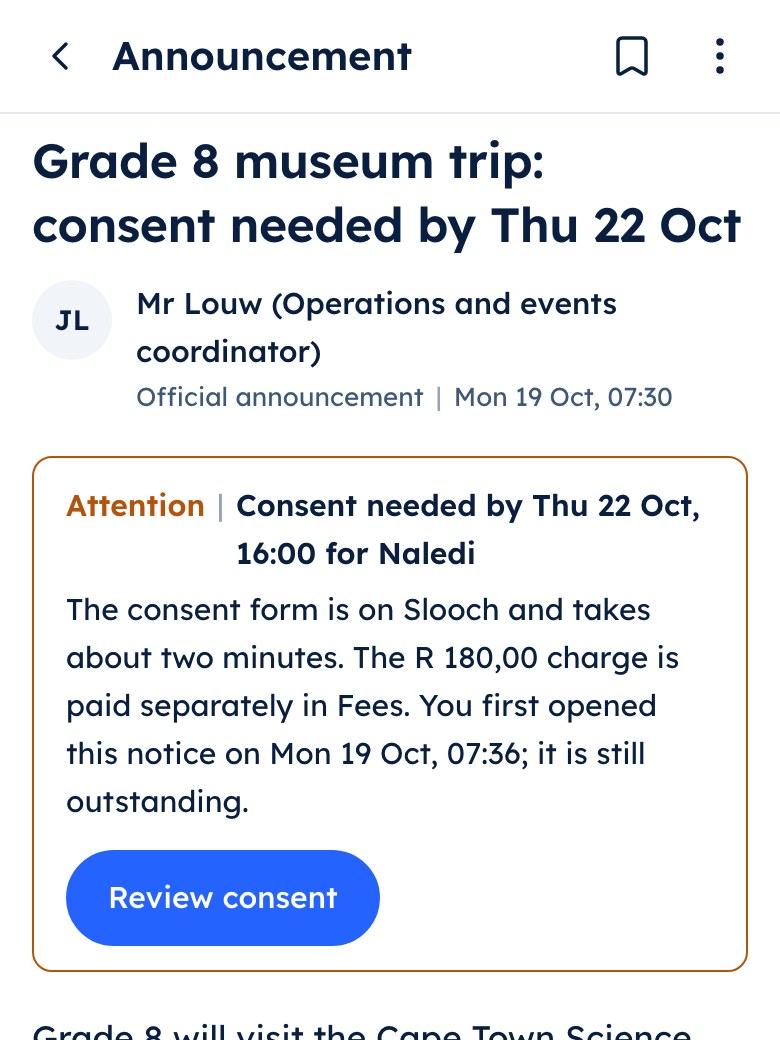
Grade 8 museum trip
- Read by the family
- Consent form still to sign
What it does
What Slooch Notices does
Built is in the product today. Planned is not built yet, and is written as what it will do.
Who has read it, signed it and done it.
Notices to the right families
BuiltSend to the whole school, a grade, a class or one family, and see who has read it.Consent and other forms
BuiltFamilies sign in the app, and the office marks the slips that come back on paper.Teacher and office messages
BuiltEvery reply box shows who reads the reply before the family writes it.Reminders to those who have not
BuiltA reminder goes only to the families who have not read, signed or paid.
Notices
- WhatsApp, email and SMSPlanned
- Urgent alertsPlanned
- GroupsPlanned
Families reached per class
BuiltThe office sees how many families a class reaches, and the count before every send.WhatsApp, email and SMS
PlannedEach notice will go out on the channel the family chose, kept per account.Act from a link
PlannedA family will sign or reply from a link without installing the app.Urgent alerts
PlannedAn urgent alert will go out on every channel at once.Groups
PlannedThe parent association, clubs and lift clubs will each have their own group.
The reminder goes only to those who have not.
Reading and doing are kept apart. A consent form stays on the parent's list until it is signed, and the reminder reaches the families still to sign, and nobody else.
- Read, signed and done, shown for each family
- Slips signed on paper, marked by the teacher who received them
- Safety and emergency notices always sent

Every class shows the families Slooch can reach.
Before a send, the office sees how many families the notice will reach and which learners have no contact on file, so the class teacher knows whom to follow up.
- The count before every send
- Learners with no contact on file, named before the send
- Each notice on the channel the family chosePlanned
Notices
- Families reached per classBuilt
- Notices to the right familiesBuilt
- Teacher and office messagesBuilt
How it works
How it works, in order
One trip notice on a Thursday at an example school.


The office sends the trip notice
Mrs Adams sends the Grade 8 museum trip notice to the three Grade 8 classes, with its consent form under it. Before she sends, Slooch shows how many families it will reach and which learners have no contact on file.Families read and sign
Lerato Mokoena sees the notice marked Grade 8 and signs the consent form in the parent app. A slip that comes back on paper is marked as signed on paper by the teacher who received it.The class teacher sees her class
Ms Dlamini sees which 8B families have read the notice and signed, and messages the one family still to answer. The family sees who will read their reply before they write it.The reminder goes only to those who have not
After lunch Mrs Adams sends a reminder. It goes to the families who have not signed, and to nobody else.The office sees what is left
By Friday the trip list shows who has signed and who has not, class by class, and Mrs Naidoo, the principal, sees the open forms on her first screen.
A school week
Moments from an example school week
On Monday Mrs Adams sent the Grade 8 museum trip notice to three classes, with the consent form under it.
Monday | Slooch Notices
An example school week
Who uses it
Where each person sees it
Every part comes with the parent and learner apps, free for every family.
School portal
The office, in the school portal
Works with
SA-SAMS, d6, Ed-Admin and Xero are the names of their owners' products. Slooch is not affiliated with or endorsed by any of them.- Reads from SA-SAMSBuilt
- Reads from d6Planned
- Reads from Ed-AdminPlanned
Learner and family lists, with their contact details, come from the school's administration system. A family's own language and channel are never overwritten by an import.
Takes over
- Parent-communication apps
- WhatsApp groups
- Bulk SMS
- Paper and online forms
Slooch runs beside what the school uses today, and takes over only when the school is ready.
Questions
Questions schools ask
Can we send to one class or one family, not the whole school?
Yes. Every notice goes to the whole school, a grade, a class or one family, and it is labelled that way for the parent, so a class notice never looks like a school notice.
How do we know who has read a notice?
Each notice shows which families have opened it. Reading and doing are kept apart: a consent form stays on the parent's list until it is signed, however often the notice is read.
What about parents who send the slip back on paper?
The teacher or the office marks the slip as signed on paper, with their name and the time. That family gets no reminder.
Will parents get notices on WhatsApp or SMS?
Notices reach families in the parent app today. Delivery by WhatsApp, email and SMS, on the channel each family chose, is planned, with a WhatsApp and SMS allowance in every package.
Do parents need to install an app?
Yes, for now. Families read and sign in the parent app, free on the phone they already have. Signing or replying from a link without the app is planned.
Can a parent reply to a teacher?
Yes. Every reply box shows who will read the reply, and the school sets reply hours. A parent who writes after hours is told when to expect an answer, and the teacher's phone stays quiet until then.
How do we know which families we cannot reach?
Every class shows how many of its families Slooch can reach. Before a send, the office sees the count and the learners with no contact on file, so the class teacher knows whom to follow up.
Can we stop using class WhatsApp groups for school notices?
That is the school's decision. The school picks the date after which official notices go only through Slooch, and the launch pack carries the letter and the WhatsApp text that tell families.
Are urgent notices handled differently?
Safety and emergency notices are always sent, even to a family that has turned other notices off. Urgent alerts on every channel at once are planned.
Can we buy Notices on its own?
Yes. Every part can be bought alone. Notices also comes in Slooch Connect with Documents and the school's page, and in every package above it.
The other parts
Every part reads and writes the same families, learners and staff, so adding one is a setting.
- DocumentsReports and letters home, and who opened them.Built
- FeesEvery charge and payment matched for the bursar.Built
- RegisterEvery register taken, and the office's view by 08:00.Built
- AdmissionsFrom the first enquiry to the signed enrolment.Built
- SitesThe school's page, kept current by its notices.Full site planned
- AssessmentsSet, mark and give out for the whole grade.Built
- TimetableBuilt, checked for clashes and on every phone.Built