Slooch Admissions
One page for every applicant.
From the first enquiry to the signed enrolment, one page per applicant.


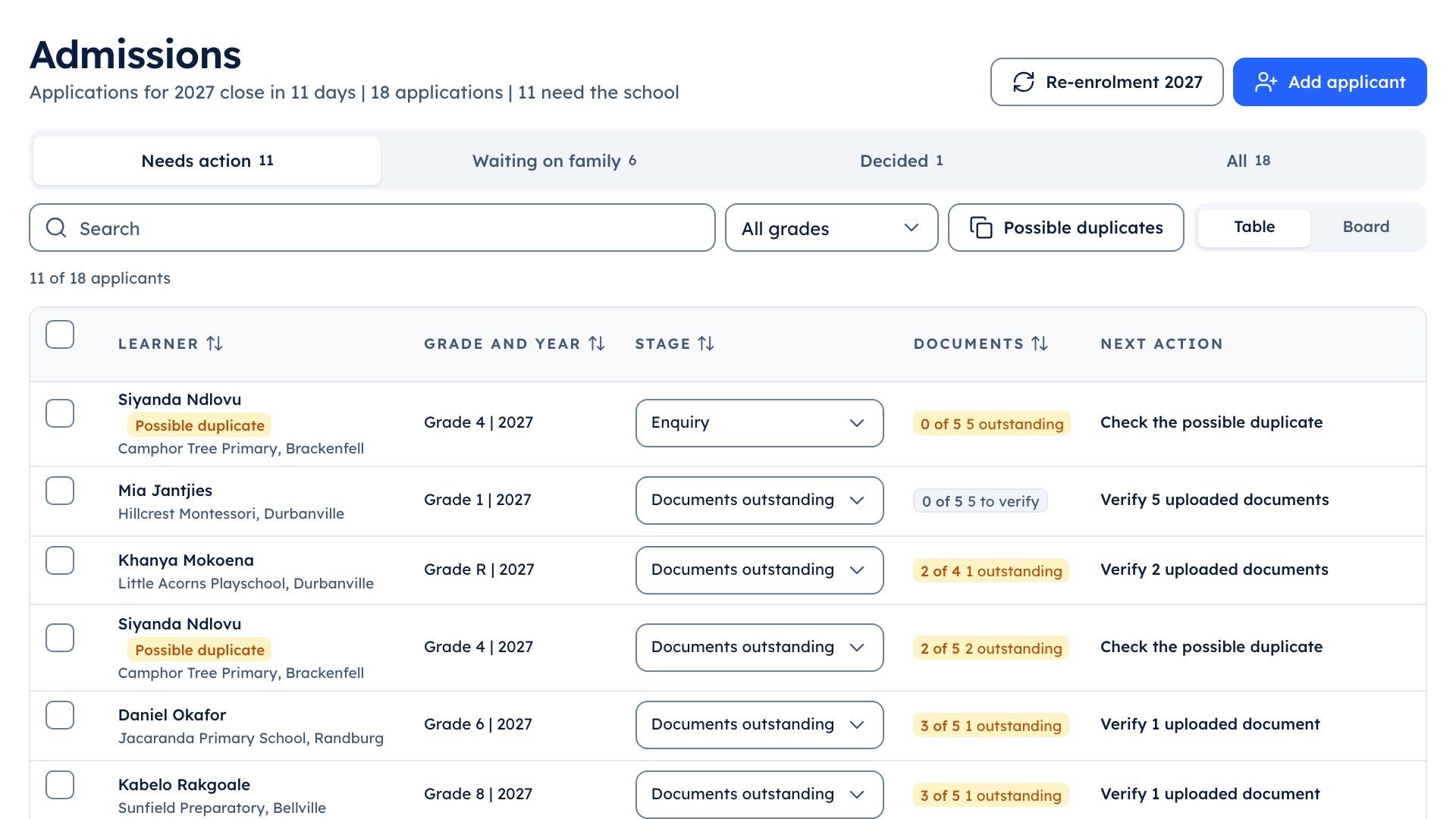
Admissions
- Application and documentsBuilt
- Re-enrolment each yearBuilt
- Waiting listPlanned
Overview
The 2028 intake out of the mailbox.
Each applicant's form, documents, readiness assessment, interview, decision and offer sit on one page. The families already at the school confirm next year's place in the same term.
Grade 1 applicant | 2028
- Readiness assessment booked
- Birth certificate asked for
What it does
What Slooch Admissions does
Built is in the product today. Planned is not built yet, and is written as what it will do.
From the first enquiry to the signed enrolment.
Application and documents
BuiltEach applicant's form, documents and readiness assessment on one page.Interview, decision and offer
BuiltThe admissions head books the interview, records the decision and sends the offer.Re-enrolment each year
BuiltFamilies confirm whether their child returns next year.Enquiry form on the school's site
PlannedAn enquiry on the school's website will arrive in Admissions.

Waiting list
PlannedApplicants will wait in order for a place, with the family kept informed.
The panel decides, and the page keeps the steps.
Mrs Nxumalo books the interview, records the panel's decision and sends the offer from the applicant's page. The family sees the offer in the app, and their answer comes back to the same page.
- Each applicant's form, documents and readiness assessment
- Missing documents asked for from the page
- A waiting list in order, with the family kept informedPlanned

Returning families confirm next year in the app.
In the intake term the families already at the school confirm whether each child returns next year, and the office sees who has not answered.
- Re-enrolment answers beside the new intake
- Family lists from the school's administration system
- Enquiries from the school's site into AdmissionsPlanned
How it works
How it works, in order
One application in the intake term at an example school.

A family applies
A family applies for a Grade 1 place for 2028 and uploads the documents the school asks for.The admissions officer checks it
Mrs Nxumalo sees the application on one page, asks the family for a missing birth certificate and books the readiness assessment.The interview and the decision
After the interview she records the panel's decision and sends the offer from the same page. The panel decides; Slooch keeps the steps in order.The family answers
The family sees the offer in the app, and Mrs Nxumalo sees their answer on the applicant's page.Re-enrolment for the rest
In the same term, the families already at the school confirm whether each child returns next year, and the office sees who has not answered.
Who uses it
Where each person sees it
Every part comes with the parent and learner apps, free for every family.
School portal
The admissions officer, in the school portal
Works with
SA-SAMS, d6, Ed-Admin and Xero are the names of their owners' products. Slooch is not affiliated with or endorsed by any of them.- Reads from SA-SAMSBuilt
Learner and family lists come from the school's administration system, so a returning family is never typed in twice.
Takes over
- Admissions by email
- Paper application forms
- Intake spreadsheets
Slooch runs beside what the school uses today, and takes over only when the school is ready.
Questions
Questions schools ask
Can families apply online?
Yes. A family fills in the application and uploads documents in the app. An enquiry form on the school's own website is planned.
Where do the documents go?
Onto the applicant's page, beside the form, so the admissions officer sees what has arrived and what is still to come.
Can we run a readiness assessment?
Yes. The readiness assessment, the interview, the decision and the offer each have their place on the applicant's page.
Who decides on an application?
The school. Slooch keeps the steps in order; the admissions officer and the panel make the decision.
Does it handle re-enrolment?
Yes. Each year the families at the school confirm whether each child returns, and the office sees who has not answered.
Is there a waiting list?
Not yet. A waiting list, with each family told where it stands, is planned.
We take applications by email today. Can we start mid-cycle?
Yes. Slooch services set up the school's forms, documents and stages for the next intake, and the office adds the applications already in hand.
Can we buy Admissions on its own?
Yes. Every part can be bought alone, and Admissions also comes in Slooch Office and Slooch Whole School.
The other parts
Every part reads and writes the same families, learners and staff, so adding one is a setting.
- NoticesWho has read it, signed it and done it.Channels planned
- DocumentsReports and letters home, and who opened them.Built
- FeesEvery charge and payment matched for the bursar.Built
- RegisterEvery register taken, and the office's view by 08:00.Built
- SitesThe school's page, kept current by its notices.Full site planned
- AssessmentsSet, mark and give out for the whole grade.Built
- TimetableBuilt, checked for clashes and on every phone.Built